Showing posts with label document camera. Show all posts

Friday, May 15, 2015

Using AT strategies to support Science learning at Secord P.S.

Future Scientists at Secord Elementary School!

Rebecca Clark at Secord Elementary School recently started a Science unit on living things.  Students in her class have been learning about parts of a plant, what plants need to grow, as well as planting bean seeds to track the growth cycle of a plant.


Itinerant Resource Teacher, Andrea Statton, met with Ms. Clark to co-plan and co-teach a Science lesson using some of the Promethean peripherals to engage her students and to have students demonstrate their understanding of plants in a variety of ways.

Students were excited to observe the changes in their bean seeds; using the sound recorder in ActivInspire with the ActivSound microphone, students shared how their seeds had changed.
Students then had the opportunity to place their seeds under the ActiView document camera so that everyone in the class could see the changes the student was describing..
This page was set up as a container activity in ActivInspire so that students would receive immediate feedback as they worked. If the students correctly labelled a part of a flower, they heard applause; if they were incorrect, the word bounced back.
Next, students were shown a time lapse YouTube video on growing bean seeds. Students were then asked what they learned from watching the video and Ms. Clark annotated their responses using the pen tool.


(left) Ms. Clark continued the lesson by asking students some Yes/No type questions; students demonstrated their understanding using ActivExpressions. (right) Finally, students documented their observations in their log book.

Monday, April 7, 2014

Family of Schools partnership: ER12 Assistive Technology and Math


In late March, a group of special education teachers gathered at Blantyre Public School for their Family of Schools professional learning session. The focus of the session was Math within the Primary / Junior Home School setting.
The session was hosted by Wendy Klayman, the HSP/MART in her classroom at Blantyre. Klayman, FOS Consultant Crys Kartos, Sharelene Bourjot, Coordinator (ER12, ER15, Behaviour) and itinerant resource teacher, Valia Reinsalu co-facilitated this session.


Along with creating look-fors in the Math classroom and using TDSB effective practices, a three-part Math lesson was modeled. Teachers had hands-on time participating in the Action part of the Math lesson.

Throughout all stages of the learning, the way assistive technology can be embedded in lessons to support student learning, assessment and problem solving in all parts of the three-part Math lesson was demonstrated. Interactive whiteboard tools (pen, highlighters, shapes, digital manipulatives and math tools, for example) can provide opportunities for differentiation in many ways (process, tasks, products). The interactive whiteboard also supports multimodal learning (images, text, audio and video). SEA Interactive whiteboard claims also come with peripherals such as a document camera and learner response systems (LRS) "clickers". 
Some teachers had a chance to try "clickers" for the first time by answering a set of survey questions.


Teacher Richard Araujo, from Danforth Gardens Public School works with his group to solve the fair sharing sub problem.

ER12 Special Education Consultant Crys Kartos shares the importance of the Highlights and Summary part of the three-part lesson when consolidating Math concepts with students.

Wendy Klayman shares how her students conducted a Math Congress and subsequently designed Math posters highlighting the big ideas about fractions.
Teachers shared their solutions using the document camera. A live photo can be projected (photo right) or captured as a digital image on the screen (photo left).
Teachers engaged in dialogue and sharing throughout the session. The set of teachers will try what they learned in their own classrooms and regroup in May for a follow-up professional learning session. 

Friday, March 21, 2014

IWB Learning Communities - Math tools to support Differentiation

The fourth and final set of Interactive Whiteboard Learning Communities is underway. Depending on the exceptionality of the group of students they teach, LC teachers are exploring Mathematics and Differentiated Strategies using Learning Response Systems or Functional Numeracy.

Mathematics and Differentiated strategies using Learner Response Systems
Part of exploring Mathematics and differentiated strategies, itinerant teachers model a three-part lesson. They also share the use of a number of math tools and activity pages that are built into Promethean Active Inspire software. Teachers discuss and explore different ways to have their students comprehend, calculate and communicate their problem solving during each of the three-parts of a math lesson using paper and pencil, concrete manipulatives and the interactive whiteboard tools.


During the Action phase of the modeled Math lesson. King Edward P.S. teacher Hartley Wynberg, creates an action on a calculator image. He then solves his problem using Active Inspire's calculator tool during the Gifted ISP LC. 

One goal of this session is for teachers to make connections of how they might use Learner Response Systems (ActivExpressions) into their Math lessons. The learner responses support student learning by allowing all students to respond to questions posed in the classroom - including those who would not normally raise their hand or feel comfortable speaking in a whole group setting.


 In an example shared during the modeled lesson, the document camera was used to capture work for a paper and inserted into the Promethean flipchart. This solution was discussed and annotated upon. Then the ActivExpressions were incorporated to help gauge the group's overall understanding of the solution that was shared.

In this example, the response system answer to "Does this explanation make sense to you?" was inserted into the flipchart page in pie chart form. This is one way for students to have instant feedback about their thinking and for the teacher to gauge group understanding. (see photo bottom left).
The IWB LCs are part of the one-year support provided by the Assistive Technology team. Groups are organized according to geography and the teacher's Special Education program.

Alana Guinane and Leonora Rochwerger, from Donview Health & Wellness Academy register their ActivExpressions (Learner Response System).


Monday, March 3, 2014

Visual support & teacher modeling using the document camera: Heritage Park P.S. spotlight

The most recent in-class observation session for the Mooneye Interactive Whiteboard Learning Community was at Heritage Park P.S.in James Watt's Intermediate LD classroom. In collaboration with itinerant resource teacher Valia Reinsalu, Mr Watt focused on the use of the document camera and the Desktop Annotate feature of the Promethean Active Inspire software during the observation teaching session.

 (To see an application of Desktop Annotate to support reading click here for our Tech and Spec. Ed Youtube video.)

Just a few ways the document camera can support the needs of all kinds of learners.

During the first part of the morning, Mr. Watt used the document camera for explicit modeling and demonstration of sketching techniques with his students in an Art lesson. The use of the live view aspect of the document camera allowed students to see dynamic change of a portrait from the before stage - prior to peer feedback of success criteria and rubric outline. The large, live visual support provides the necessary scaffolding that his learners require. A few students have auditory processing or working memory challenges and the visual helps them to make a concrete and more lasting connection to the oral discussion about their sketches. 

"Sitting at the projection desk allows me to demonstrate, respond to questions and repeat demonstrations/process as necessary.  I will find it hard to go back to teaching without this powerful presentation tool." - James Watt, Heritage Park P.S. Intermediate LD teacher

The entire lesson was recorded using ActivInspire's screen recorder so that students could review the lesson at a later date as many times as required.

Mr. Watt used student feedback to make changes to a copy of a student's sketch so that students
could visual see adjustments made, based on the required sketching criteria. Above right - the camera tool on Active Inspire allows for the capture of the before and after lesson image - as well as a large format of the rubric (which can have annotations added.)

Thanks to Mr. Watt for another successful in-class observation session, which highlighted a simple but powerful uses of the document camera to support student learning and understanding. 

Host James Watt, Heritage Park P.S. with LC observation teachers (left to right): Anita Ghosh, Charles Gordon  P.S., Rebecca  Chahine, Heritage Park P.S. and Samantha Bunting, George  Peck P.S.

In-class observation sessions are part of the year-long Learning Community support given to special education teachers, whose programmes receive the SEA Interactive Whiteboard group claim for this school year. There are four LC sessions at East (Terraview Learning Centre) and West (Burnhamthorpe Adult Learning Centre) sites along with opportunities for Job Embedded Professional learning in the form of co-planning and co-teaching with one of the six itinerant teachers who lead specific LC groups. The LC groups are formed based on geography and on student exceptionality.

Monday, January 27, 2014

Learning Community recap - engaging students using multimedia

Special Education teachers participating in the Interactive Whiteboard Learning Communities this year just completed session three - Engaging Students using Multimedia. At some of the sessions, including the intermediate Home School Program / Learning Disabilities Learning Community group, part of the LC session included a guided-reading lesson in order to highlight ways the document camera could support students.

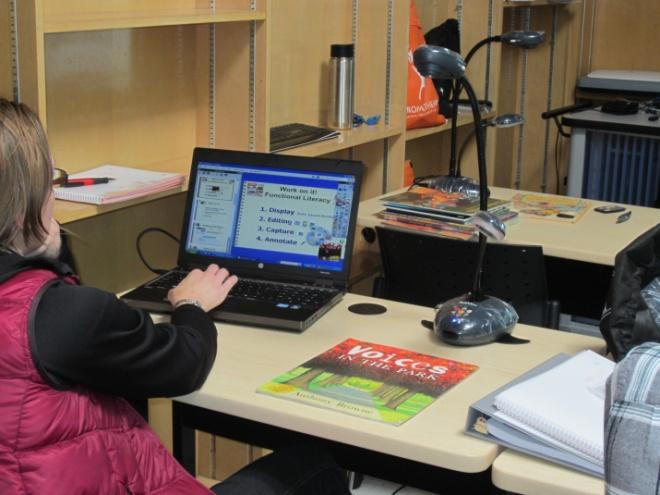
A simple and engaging way to use the document camera is that any document such as textbook, picture book, or worksheet can be projected right onto the Interactive Whiteboard, which provides students with a large visual support during guided reading activities.

Along with a live view, the teachers also explored how student work can be captured and stored digitally onto an ActivInspire flipchart. This allows for editing and annotating - while the student's original work is left intact.

Capturing a page of a picture book using
the document camera.
Int. HSP teacher, Stephen Scott from J.B. Tyrrell P.S.
uses the document camera to produce a live image of his writing.
Along with still images, video can be captured using a document camera. The camera is on a movable arm, which can be pointed to face a student or teacher. Teachers can record prompts or instructions that can be reviewed by students as many times as is required. Students can also record their ideas which can be replayed and examined - supporting their oral communication of ideas as well as helping them to develop presentation skills.

Naomi Wyman, Intermediate HSP teacher at G.A. Brown, practices
using the document camera to record a video of herself asking questions.
During the session, teachers were given hands-on time to build a lesson around a literacy document they brought with them. The itinerant resource teacher helped to support the embedding of the technology to accommodate student learning needs. Following some reflection and discussion, the Intermediate LC came up with a list of a few ways they would immediately go and use the document camera in their classrooms including one teacher who commented: "The document camera can be used in all curriculum areas to engage the students and help model and differentiate instruction."

Other examples of teacher responses included:
  • Teacher and student modelling, procedure, guided reading
  • I am excited to try with a microscope.
  • Hands on tech demo, art process demo
  • Demonstrate math solutions with manipulatives
  • Another way to share what they (students) have learned
  • Presentation, show math solutions and reading language texts
  • Animation

Intermediate HSP teacher Anita Ghosh used the document camera on the following week. Her students used
the document camera to share a comic strip they created during a Visual Literacy co-teaching session


Friday, January 10, 2014

IWB LC3 - Engaging all: Learning through Multimedia (ASD ISP example)

IWB Learning Community #3 – Engaging All Learning through Multimedia:
Supporting Teachers of ASD Intensive Support Programs

Our Assistive Technology Itinerant Teachers are eagerly looking forward to facilitating the third installment of our Learning Community sessions!


Session three focuses on the ActiView document camera and incorporating multimedia in order to differentiate instruction and engage all learners. Our “Goby” Learning Community group for teachers of ASD ISPs will also explore how the ActiView document camera and the screen recorder tool within ActivInspire can be used to support the explicit instruction of pro-social behaviours for students with an ASD through video modelling.


Interested in step-by-step information on how to use the ActiView document camera and the screen recorder tool to create video models for students with an ASD?

Check out our video tutorial on our YouTube Channel – TechandSpecialEd:


The TDSB's Special Education department's Interactive Whiteboard Learning Communities focus on supporting teachers in using the IWB in a teaching and learning capacity within in their HSP and ISP classrooms. Our groups are organized based on exceptionality and division and specifically support special education teachers who have received a SEA IWB in the 2013-2014 school year.

Thursday, September 5, 2013

Assistive technology team gears up for another year - it's September!

Another school year has begun and the Assistive Technology team is busy. The differentiated professional learning tasks they are fervently preparing include curriculum, Learning Community and technical software files and workshops to support special education staff at the Toronto District School Board.


The following blog entry is a snapshot example of what a Learning Community member experiences during one of the in-class sessions at Terraview Learning Centre (East) or Burnhamthorpe Adult Learning Centre (West). While the four 2013-2014 Learning Community sessions are limited to teachers, whose programmes received the Special Education Amount (S.E.A.) Interactive Whiteboard  group claim this year, the Learn 360 website highlighted in this entry, is one of a number of digital resources that can be found on the TDSB's Virtual Library.

Supporting Teachers through Multi-Media 

Teachers at the second Interactive Whiteboard (IWB) Learning Community (LC) session last year were very excited to learn about and receive an ActiView Document Camera. They explored how to show live displays of various materials, from literature to 3D objects. Then from these images they created higher level thinking questions to scaffold their students learning. Along with this, they also discovered how to use the ActiView to make videos. They practiced using video to model things such as: task completion, self-regulation strategies, introducing new concepts, etc., as well as to use video to capture student learning. Finally, they were taught how to insert video, both their own and videos acquired from www.learn360.ca, into their lessons.
Learn360 is a ministry licensed multi-media educational site that “supports the learning and interests of students within a wide range of ages and grades. “ On this site, they have over ”63 000 media resources from trusted educational publishers and producers, which will ENGAGE your students, ENRICH their learning experiences and drive them to EXCEL both inside and outside of the classroom.”


ActiView camera
Teachers being shown the use of the document camera.


Teachers exploring the use of the ActiView Document Camera at a Learning Community Session.

Friday, May 24, 2013

Mackie P.S. - You Inherited an IWB – Now What? ~ Observation Class

You Inherited an IWB – Now What? ~ Observation Class on Inferring

This year the SEA Department - Assistive Technology implemented a new project entitled “You Inherited an Interactive Whiteboard (IWB) - Now What?” to support teachers who have an IWB in their special education class but may not have been part of the initial training that came with the IWB. In addition to a Learning Community Model that supported teachers through 4 half-day sessions that modelled how the IWB could be used to support their special education students through various curriculum objectives, the participants were also given the opportunity to engage in a co-planning/co-teaching session with an Assistive Technology Itinerant Teacher.
Margot McFarlane, from George P Mackie, volunteered for this opportunity. She met with the Itinerant Teacher and together they co-planned an engaging, hands-on lesson on Inferring, use the Promethean Board and Ladibug Document Camera. Teachers from the Learning Community were invited to watch the teaching of the lesson, along with an opportunity to pre-brief before the lesson and debrief afterwards.
The book “Something Beautiful” was selected for the lesson. It was introduced to the students by displaying it with the Ladibug Document Camera. Students used the various IWB tools (Pen, Camera, Keyboard, and Sound Recorder) to record their predictions. The visual and auditory support allowed students to convey their responses in a format that was most comfortable for them.
                        
            The remainder of the book was shared with the students, again displayed with the Ladibug Document Camera. Afterwards, images of the story were used to help support students’ understanding of Picture Clues and Text Clues.
Reviewed concepts of Picture/Text Clues and Background Knowledge with visual supports.
Students used this knowledge and the IWB tools to make an inference.
  

                Students were then given a different part of the story, and in partners, had to make an inference.


Margot McFarlane (teacher) showing her student how to use the Ladibug Document Camera to capture an image. 


Student using the Camera Tool to capture a text clue for her inference.

Thursday, March 7, 2013

Assistive technology - IWBs supporting the Gifted learner


Interactive Whiteboard supporting gifted learners
The SEA Interactive Whiteboard group claim Learning Communities continue after the March break with sessions at Terraview Learning Centre and Burnhamthorpe Adult Learning Centre and in classrooms. Many in-class observation sessions have been held in the days leading up to March 8th.
One learning community at Terraview Learning Centre includes those who teach students with the gifted exceptionality. The use of an interactive whiteboard in the gifted classroom supports differentiated learning as well as collaboration between peers as well as between students and teacher.
Jack Levy teaches students of the gifted expectionality at Three Valleys (grade 4/5). He hosted a recent observation lesson using the Learner Response Systems "clickers" during a math lesson.
The LRS are one of three peripherals that each IWB group claim receives as part of their LC participation during the year. Response systems allow all students to have a voice (either by name and anonymously) when asked a variety of question types (text, multiple choice, likeart scale, true/false, yes/no, sort in order and numeric). Teacher can assess student understanding, maintain engagement and collect data using the response systems in conjunction with the IWB software.


The "pre-brief" session, sharing the lesson, pedagogy and A.T. tool use
based on student learning needs and styles of classroom students.

Learning Community members Ms. Terry Lwin, Clinton P.S., Ms. Dolora Harvey, Chester E.S., (Host) Mr. Jack Levy, Three Valleys P.S. and
Three Valleys colleague grade 3 teacher Ms. Lisa Mildenberger. 


Strategies to"determine the unknown".


Observing the lesson.
 

An essential tool

The Promethean Board has been an integral part of the Gifted programming, and cemented itself as an essential teaching strategy in my classroom. The Promethean board helps my students to realize the academic and personal programming goals (Thinking, Awareness of Self and Others, and Research) set out in the Gifted program. Most importantly, it supports a differentiated approach where I can meet the varied learning styles of all my students. Being able to annotate over top of websites and documents helps me model how to pull the most important pieces of an activity, and then be able to watch students demonstrate that skill. Using the active response systems has made assessment immediate and relevant. It also enables my students inform me anonymously and instantly if they do not understand the concept or content under study. ActiView has allowed us to share and analyze our artwork, manipulate our solutions during the congress of a three-part lesson, and respond to each other’s journal entries in Language. Lastly, the Promethean board has facilitated the need for 21st century students to be engaged with technology on a regular basis. The Promethean board is possibly the most important teaching tool to support pedagogy of progressive teachers. - Jack Levy, Three Valleys P.S.


Teacher testimonials - The power of the IWB to support all kinds of learners

In my gifted class, I have students with different learning styles and challenges. The flipcharts on the Interactive Whiteboard enable key information and instructions to be easily accessed by students throughout the lesson. This is particularly important for the number of visual learners in my class. In addition, it provides the opportunity for students to refer back to previous information on a flipchart to clarify the information and/or the task when they are working on a follow up activity. Reminding students to refer back to the instructions on the Interactive Whiteboard helps them to complete tasks and decrease potential frustration.
 We use the document camera in all areas of the curriculum. It is especially helpful when we are sharing student work and want to compare it to the success criteria in order to plan the next steps of our learning. Students have used the document camera during presentations so that the whole class can see their diagrams and illustrations as well as models they have made.  The students love the response systems and entering their answers comes naturally to them.  Reviewing the results has set the starting point for many discussions.  It also enables me to easily see if students understand the concepts.
- Dolora Harvey, Chester E.S.

As a teacher in the beginning stage of incorporating the IWB into the gifted classroom, I find that being able to access global IWB lesson plans and resources at enriched levels to teach specific learning concepts most useful. My students were engaged in building models using IWB virtual manipulatives and tools and then comparing with actual models ( using cubes). I like using the document camera as a teaching tool for motion geometry where I can manipulate the shapes and various movements. I am learning to integrate learner response devices for quizzes and for gathering opinion. Thanks for everything. - Terry Lwin, Clinton P.S.

Building capacity

Not only has a Learning Community amongst IWB users been established, but teachers at Three Valleys - both special education and non-special education designated classrooms are sharing resources, strategies and student use.


At Three Valleys P.S. there are many partnerships which are building capacity in the school for
the use of the IWB with students.Teachers of gifted exceptionality students transform strategies using A.T. tools of the IWB: Avi Gold (left) and Jack Levy (right).

Learning Community model
Teachers, whose classrooms received a group claim IWB for the 2012-2013 school year, attend three learning community sessions, and have the opportunity to host and/or observe classroom practice throughout the year. Groups of teachers are organized based on exceptionalities and geographic location, so that modelled lessons show and use IWB tools which support the student specific needs and that teachers, as they build community can share successes and challenges in their similar classrooms. Navigate our blog to read about projects and updates. To stay current subscribe to our e-newsletter, click here.


Thursday, January 24, 2013

S.E.A. team e-news and using the document camera to support all learners

The SEA enews (newsletter) is now on a new site!

The S.E.A. side news can now be found at: http://eepurl.com/sQnHv .

Get the latest information about how the S.E.A. department is supporting students with assistive technology. Subscribe so you can get the information automatically!


Using the document camera to support student learning
A document camera is the latest version of the overhead projector. Part of this year's SEA claim, current interactive whiteboard Learning Community teachers receive this peripheral during LC2 session. It's a teaching technology tool that helps to enhance student learning and provides a means that all student work can be valued and shared.

The ActiView document camera is part of this year's SEA claim.
Some ways to use the document camera

Live view - project what is placed directly under the camera
eg. prediction, inferencing from cover of the book
     -read alouds
     -sharing work, procedures broadcast on large screen
     - experiments
"Live" image of a book cover in the ActiView window.

Captured view - take a digital copy of what is projected and annotated, saved
eg. - journal or any writing, can be annotated on student work without marking up orginal paper
eg. math congress compare strategies and answers to promote thinking, questioning and sharing, One advantage of having captured work from the document camera is that the student work can be annotated on by the teacher or student and the original copy is left untouched. Or for fine motor skills support, the same paper assignment can be chunked and enlarged so a student can use the digital pen to record his or her answer.


The same cover has been captured and inserted into an ActiveInspire flipchart page for annotation and discussion.

Video capture - short, video (avi format) can be captured and replayed for use in the classroom in many contexts
The ActiView must be used in collaboration with ActiveInspire's screen recorder to get sound on the video.

eg. teacher or student presentation, practice oral communication, DPA, drama and dance etc.
Below is an example of a science experiment examining solutions.


Fall Host classroom Math three-part lesson and the document camera examples
The document camera can be used in many of the parts of the three-part Mathematics lesson. Below are some examples of Math congresses done during Host teacher sessions. In the below example Mentor teacher Stacie Berman from Dunlace P.S. has five of her students' calculations projected on the whiteboard during a host classroom session in November. As each example was discussed, the specific image was resized large to fit the screen and reordered to be on top and covering the other examples.
How can I represent money amounts? (P/J HSP)
In the Warden P.S. example, Mentor teacher Shailesh Maharaj's students can discuss and annotate images captured with his document camera. During this fall host classroom, the student discussed her problem solving method long after the classroom manipulatives were cleaned up.
Solving word problems (J/I HSP).

What is the algorithm? Following a Math Gallery walk in Jack Levy's Junior Gifted classroom at Three Valleys P.S., a student picked an example of a strategy that is different than his own to share and discussed the work. The example was captured and enlarged so that his peers in the classroom can see.
This blog entry illustrates just of the few applications of the document camera, in collaboration with the Interactive whiteboard and ActiveInspire software that promotes student learning. All students learning styles can be supported using visuals, sound and multimedia. Student work is valued and shared. For students with low vision, the digital images can be enlarged, while for students with memory processing difficulties, work that was captured can be saved, printed out and revisited on the IWB again and again.

Thursday, January 10, 2013

Mentoring the Interactive Whiteboard Learning Communities

Mentoring


Mentoring is a brain to pick, an ear to listen, and a push in the right direction. ~ John Crosby


We are very fortunate to have some former TDSB Interactive Whiteboard Learning Community (LC) members acting as mentors for our current LC teachers. This opportunity gives experienced interactive whiteboard (IWB) users the opportunity to share their successes and challenges with using IWBs whilst offering support to new IWB users, to help them build on their own expertise. The "Come Back and Swim with Us" SEA team project is new this year. In total, there are 20 special education teachers from east and west regions TDSB participating as a mentor this year.


At a recent Learning Community for teachers who teach students with Learning Disabilities, mentor Michael Azzopardi from Millwood Junior School shared a Science lesson that he taught his students using the IWB.

Michael is displaying a graphic organizer used by a student in his HSP class on the IWB.
Michael demonstrated how picture clues were provided to the student along the left-hand side of the IWB. The student was then able to use the pen tool to jot their point form notes on the graphic organizer provided.


Michael then showed how student work could be captured, using a document camera, to help with editing student work. Michael had the students use “digital whiteout” by selecting the pen tool with white ink to erase their error. Students then chose a different colour to write in their correction. Michael found that more students were able to catch their own errors when their work was displayed on the IWB.

Modelling the editing process: Michael demonstrating how student work was captured using the document camera so that students could edit their own work on the IWB.


This sharing of best practices inspired many of our current Learning Community members to appreciate the different ways the IWB and peripherals can support student learning.


Friday, January 13, 2012

SEA IWB Learning Community session 2 - Document Camera, Slate and Media (wrap-up)


SEA Interactive Whiteboard Learning Communities - Session 2

Our second set of SEA IWB Learning Community Sessions took place in December.  The focus was on integrating the Ladibug document camera and slate into teaching.Teachers were excited about the possible uses of the Ladibug which included live demonstrations of cooking activities, the ability to display non-fiction text, annotate key ideas and features and capture the learning digitally as well as being able to document mathematical problem solving through video.  Using the Ladibug enables teachers to provide real life concrete examples to students, engage students in inquiry based learning and to make abstract concepts more concrete, to name a few benefits. Click the player (below) to hear the text read to you.


Teachers of Low Incidence classrooms modeled the sequence to create a gingerbread man.

Teachers of Gifted classrooms displayed thought provoking photographs from a text to build inferencing skills and confirm predictions using visual notetaking.

Monday, November 28, 2011

SEA IWB Learning Communities - sessions at BCI (West) and Terraview LC (East)


SEA Interactive Whiteboard Learning Communities
Learning Community sessions
Interactive Whiteboard Learning Community sessions are one way that the SEA department supports teachers who have SEA group claim Interactive Whiteboards in similar Special Education Classrooms.
The title of the first of four sessions was called: Getting Started. At these sessions there was a model literacy lesson (persuasive writing) followed by teacher work time.
(Left) Creating an attendance page. 


(Right) Building an interactive (SMART) language lesson.


Community partnerships
Learning Communities provide the opportunity for teachers to plan, find resources and create materials in a supportive and collaborative environment. Teachers team up with one another, SEA Department staff and presenters. 
 Creating a math lesson using Active Inspire (Promethean) software with one of our presenters. 
Visualization
December brings the second Learning Community session: Document Camera and Multimedia.

A document camera (also known as a visual presenter) is a versatile tool that allows teachers to, for example, project and film live demonstrations, project and annotate a text, and grab students attention by zooming in on the details of an artifact. 


Strategy: Visual information (Document camera): Teachers can visually share information with students that might otherwise be inaccessible to a large group. eg. shared/modelled cross-curricular tasks.
Students can demonstrate and present their thinking and problem solving solutions in all subject areas.


post list