Showing posts with label DD ISP. Show all posts

Tuesday, May 19, 2015

Brown Bear comes to Thorncliffe Park P.S. - IWB co-teaching session DD ISP

Brown Bear Comes to Thorncliffe Park

The primary DD program at Thorncliffe Park P.S. received a Promethean Interactive Whiteboard (IWB) for their classroom through the Group SEA Claim process. Classrooms who received SEA IWBs were supported throughout the school year through Learning Communities and co-plan/co-teach job embedded learning opportunities. Donna MacKinnon, Primary DD Teacher of this program, co-planned and co-taught a lesson with Itinerant Resource Teacher, RenĂ©e Keberer, supporting this Learning Community.  


Donna’s students have been actively using their IWB, so a lesson was designed about reading and interacting with the book “Brown Bear, Brown Bear” on the Promethean Board. Using the ActiView document camera, screenshots of the book were taken so that the book could be displayed on the IWB. As the story is interactive in nature (sliding tabs and finding objects), this was recreated using various IWB tools. The students would take turns coming up to the IWB to reveal the various animals hidden on the page as the story was read. After the book was finished, independent follow up activities were created for each student to meet their individual needs and ability levels. Some activities were one-to-one matching, selecting the correct item to match, and matching the correct colour to the item. The students were able to navigate to their specific work page by touching either their name or photograph, which would directly link to their activity. While the students completed their independent task at the IWB, the other students were at different centres around the classroom completing various tasks. 

Teachers who observed the lesson were impressed with the engagement of the students and their proficiency with the Promethean Board.


Thursday, April 17, 2014

Circle time using ActivInspire - Restrictor example at Seneca School


Using Restrictors in ActivInspire to Set Students up for Success


Ms Forhan leads her class during circle time asking them, How are you feeling today?


Melinda Forhan teaches a Developmental Disability Class at Seneca School and often uses restrictors when setting up Activities in ActivInspire on the Promethean Board for her students. For example, as part of her daily Circle Time students come up to the Promethean Board and choose the picture symbol that represents how they are feeling that day. Students then drag the picture symbol up from the bottom of the page into the appropriate column. After each student has completed this activity the class counts how many students are feeling happy, sad, tired or angry.
To help set her students up for success (minimizing distraction and assisting students with fine motor challenges), Melinda restricted the picture symbols so that students could only move them vertically on the page which helped ensure students moved the symbol into the appropriate column.


For more examples of ways to use restrictors in ActivInspire or to learn how to set up activities using restrictors please watch our YouTube video “Using Restrictors to Support Students with Fine Motor Challenges”. https://www.youtube.com/watch?v=FwpcRhMpvvw

Friday, February 14, 2014

Host teaching session at Maryvale P.S. - Jr DD class

As our Learning Communities progress, more teachers are participating in our job-embedded learning opportunities by co-planning, co-teaching, and hosting fellow LC teachers as observers.  On Friday February 7th, Rob Lovering Spencer, Jr DD teacher at Maryvale PS hosted a group of fellow DD teachers to observe a very patriotic Winter Olympics-themed lesson that was co-planned and co-taught with East Itinerant Resource Teacher, Etienne Mercieca.  

Mr Lovering Spencer was very careful to include elements that would allow his students to connect to the lesson, including visuals, the use of the sound recorder, and embedding video. He also found a creative use for the document camera by using it to allow the students to be able to see themselves on the Promethean board while following the movements being described in the video.  Rob differentiated his lesson to suit the needs of his various students by allowing them different ways and opportunities to engage in the lesson.  

Mr. Lovering Spencer inviting his students to share what they already
know about the Winter Olympics using the sound recorder.


A student sharing his thoughts
using the Sound recorder.

Mr. Lovering Spencer has now captured many of his students’ ideas. All students' voices are being heard and honoured.


Rob demonstrates his enthusiasm for the lesson. Students are given the choice of the wand or microphone to participate in the lesson.

A student uses the pen and eraser tool to reveal the words describing the picture. Mr Lovering Spencer also recorded his voice reading the words so that students could play the words to hear them, providing auditory support in the activity.


Observing teachers went away on Friday afternoon with a copy of the lesson, but more importantly, a number of new ideas to take back and try in their own classrooms. Thank you, Rob, for agreeing to host teachers from our learning community and thank you to you and your students for providing such a rich and insightful afternoon!

Opaleye LC teachers observing Rob’s lesson (from left to right): Rita De Pompa, Sumithiraa Arif Ahamed, and Hamideh Vassegh. Also at far right, Low Incidence Consultant, Sue MacVicar-Stewart, who also participated in the observation.

Thursday, November 7, 2013

Itinerant assitive technology referral at David and Mary Thompson

Our Assistive Technology referral process is underway and in full swing! Itinerant Resource Teachers (IRTs) have been working with Special Education teachers in a variety of settings providing job-embedded learning opportunities through the co-planning and co-teaching of lessons using assistive technology. In one example, Etienne Mercieca, IRT in the East collaborated with Gosia Lizon, teacher of high school students with developmental disabilities (DD) at David and Mary Thompson. Together, they developed a social skills lesson for Gosia’s students using the Promethean Interactive Whiteboard.  

The lesson was tailored to suit the interests of Gosia’s students by incorporating images of Justin Bieber, Taylor Swift, and Rihana, into the ActivInspire flipchart pages.  The lesson also made use of several of the Interactive Whiteboard’s tools such as the sound recorder, containers, and hiding of images. By using the technology to differentiate the lesson, students were immediately engaged and were able to access the knowledge and information that was presented.

See below for some screen images of the activity that was created.

Words to use at school to explore the hidden curriculum such as social communication at school: Thank you. Excuse me. etc.

Students were given engaging images to examine and refer to when determining appropriate social cues at schools, 

Our itinerant referrals are happening throughout the TDSB in both East and West Region schools. See a past A.T. blog post highlighting another referral in a D.D. class (also known as Low Incidence classroom) in a primary class at Clinton P.S.

Friday, April 19, 2013

In-class observation session in PJ DD classroom

In-Class Observation Session in Primary-Junior DD Classroom


Katie Barron is the teacher of a Primary-Junior DD Classroom at Seneca School in Etobicoke. Katie is one of approximately 300 Special Education teachers in TDSB who received a Promethean Board in her classroom through a group SEA (Special Education Amount) Claim this year. Along with other special education teachers with new SEA claim funded Promethean Boards in their classrooms, Katie has attended three Learning Community Sessions during which Itinerant Resource Teachers model ways to use the tools available in ActivInspire (the software program that comes with the Promethean Board) to support students’ learning needs.

Katie hosted an observation session in her classroom for some teachers in her Learning Community to come observe how she uses the tools available in ActivInspire to meet the students’ individual learning needs. During her morning circle time, Katie used the Promethean Board to incorporate IEP learning goals that the students are working towards (e.g., spelling their own name, what to do when you are feeling angry, participating in group activities, pointing to and tracking symbols during shared reading).

During Circle Time, Katie lead her students in a song “When I’m Angry and I know it” (sung to the tune of, “If you’re happy and you know it”).  Boardmaker symbols are used to remind students what to do when they feel angry (e.g, count to 5, listen to music).

Recently, Katie has been working with her students to identify and label actions (verbs) but felt her students were not ready to identify actions by looking at pictures (e.g., picture of someone eating). During a co-planning session with Lisa Mast, Itinerant Resource Teacher, Katie learned how to insert multiple videos of staff doing actions (e.g., eating, clapping, eating) onto one page in ActivInspire. The goal of this learning activity was for students to be able to answer the question “Who is running?”. Students used their voice or communication devices (e.g., Dynavox) to respond with the name of the person who was running in one of the three videos. Students were engaged in this activity and enjoyed seeing the staff and students in their classroom in the videos on the Promethean Board.


Two videos were inserted on a page  (one with a student eating and one with a staff member clapping) and Katie asked students the following  questions: Who is in each photo? What is each person doing? Who is eating? Who is clapping?  

Teacher Testimonials:

“Having the Promethean Board in my classroom has made it easier for me to differentiate lessons for my students at various levels of learning.” Katie Barron, DD Teacher

“I learned a lot from our Promethean Board Learning Communities that I am currently using in my program. But seeing the Promethean Board in use in a classroom with students has been amazing. The teacher showed how much I can do with the Interactive White Board. I really enjoyed seeing how she used the IWB to enhance the student’s knowledge at their individual developmental stage. I am looking forward to bringing what I learned today back to my classroom and incorporating it in to my program.” Sara Bueno-Bradley (Observing Teacher and Promethean Learning Community Member)


Friday, November 16, 2012

Assitive Tech TDSB: Curriculum PD session spotlight

Professional Development Sessions
This week we launched a new series of PD sessions; ‘Using IWB to support students in DD ISP classrooms’ and ‘Using IWB to support students with ASD’. Both these sessions were available on Key to Learn for registration.
The first session provided participants with strategies and suggestions for using the SMART and Promethean Board to support students with developmental disabilities. Through demonstration and hands on experience, participants explored how to use the IWB to support readiness, reasoning, fine motor skills, language and mathematical skills among their students.

Embedded sound file (right of page) allows for student independence as instructions
are read out loud so students can play file as many times as required. 


Tools like a digital pen and eraser (bottom left of page) can be embedded on the page
to allow for easy student access to tool selection.

The second session provided participants with strategies and suggestions for using the Interactive White Board to support students with Autism. Participants explored how to use the interactive white board to support communication, attention, social skills and participation among their students.


Keep an eye open on Key to Learn for additional sessions throughout the year!

Thursday, June 7, 2012

SEA IWB Learning Communities come to an end

21st century literate learners - Visual literacy to promote Critical thinking

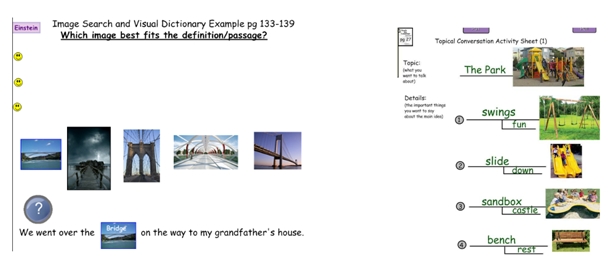
Our final Learning Community (LC) ended on a high note focusing on literacy, specifically visual literacy. The power of pictures to teach, make predictions and inferences, and draw conclusions and summaries, were highlighted throughout this session. Using the Luke and Freebody Four Resources Model to emphasize the important elements of being literate in the 21st century, along with “High Yield Instructional Practices” that focused on i) Good Questions ii) Accountable Student Talk iii) Critical Thinking, helped to shape this very interactive session. Carefully chosen pictures and scaffolding questions help to derive relevant information from visuals.

The Critical Thinking Consortium's
Investigating Images unit


Teachers worked through a number of pictures, aided by appropriately placed/timed questions, gradual revealing of the picture, and gradual presentation of facts. The richness of the discussion that resulted paired with the questions that were raised allowed for a much deeper understanding of ‘what was happening in the picture’ rather than just simply taking a quick glance.

Functional literacy - DD exceptionality focus

The DD teachers looked at functional literacy with visual supports. Again with the support of Sue Macvicar-Stewart, Low Incidence Coordinator, teachers were presented with developmentally appropriate ways to teach functional literacy – from the concrete to the visual to the abstract. Teachers were also shown numerous ways to help their students express themselves, as independently as possible, using various assistive technology programs and equipment, such as Clicker 5, Read and Write Gold (Picture Dictionary), Boardmaker, and the Ladibug Document Camera.


Reading Comprehension & Social Language for ASD students
The ASD teachers focused on reading comprehension and social language. Many students with ASD have a narrow and deep information base, meaning they know lots of information but only on a few topics. This really limits their literacy ability- from vocabulary to social interaction. Various strategies were demonstrated that discussed visual ways to teach vocabulary, for example using visual dictionaries, word associations or connotations, and contingent words or analogies. Other visual ideas were presented which further helped support reading comprehension and social conversation. Monica Rivera, Speech and Language Pathologist with the ASD team, provided invaluable resources and support for this session.


Promethean Bus visits a success


The AT Team and Promethean shared the learning technology with the TDSB Special Education Advisory Committee (SEAC) Monday evening at 5050 Yonge Street.

TDSB staff, students and the Special Education Advisory Council enjoyed visits with the Assistive Technology Team and Promethean Interactive Whiteboard members as part of the Promethean bus tour this past week. The bus parked outside of Head Office (5050 Yonge Street) on Monday.  TDSB schools, whose IWB group claim have been approved for the upcoming school year 2012-2013,  were invited to visit the bus at Cosburn M.S. and Glamorgan P.S. in the east on Tuesday. On Wednesday, the Promethean bus and AT team visited TDSB West at George R Gauld P.S.


See next week's blog entry for photos and video of the "TDSB AT Spring Tour 2012" event.


post list