Showing posts with label Professional development. Show all posts

Friday, March 27, 2015

Switch On Learning at Scarborough Village P.S. - Alternative Access Project

Switch On Learning at Scarborough Village

Recently, Miriam Taylor, Special Education Teacher at Scarborough Village Public School, hosted an observation classroom at her school to demonstrate how to use Alternative Access Devices with her students. Ms. Taylor is involved in the Alternative Access Pilot Project this year. She, along with teachers across the TDSB, has been attending Learning Community Sessions to learn how to incorporate Alternative Access Devices into their classrooms to allow students to participate in classroom lessons and activities and to demonstrate their learning and understanding. Through this project she had the opportunity to Co-Plan and Co-Teach a lesson with an Itinerant Resource Teacher with Assistive Technology.

During the Co-Planning session, a music sound effects activity was created for one of her Low Incidence classes that provided the opportunity for the students to use “switches” to access the Promethean Board.  The students used the “switch” to click on the musical instrument image to make the image move in some way, for example, get larger, turn, etc. They then used their “switch” to click on the sound icon to hear the musical instrument play. Afterwards, they were given the actual musical instrument to play on their own. Finally, they used their “switch” to click on the next page arrow to turn to the next page. There was one page created for each student in the class. Once everyone had their turn, all the students played their instruments. Switch accessible interactive music websites were visited after the “musical performance” where the students could create more music.
The students were engaged and learning the cause and effect aspect of using Alternative Access Devices. The visiting teachers were excited to see how the students responded to the switches and left with many ideas to incorporate back in their own classes. 


Two students using the BIG Mack Communicator Switch to have a pre-recorded welcome message read to the visiting teachers.
(left) Example of one of the lesson activity pages. (right) The Jelly Beamer switch used by the students for this activity.

Ms. Taylor showed how she adapted the n-ABLER Joystick for one of her students to focus on only one button (red – left click). The traditional joystick handle was also replaced with the “T bar” to allow for better grip. More buttons will be revealed when the student is ready.

Thursday, December 11, 2014

Spotlight Curricllum PD session: Using the IWB to Promote Body Awareness for Adolescents with Developmental Challenges

Curriculum PD Session

A new Curriculum PD session on Key To Learn entitled, "Using the IWB to Promote Body Awareness for Adolescents with Developmental Challenges" was presented to a group teachers at Burnhamthorpe Adult Learning Centre this week. This session focused on strategies and suggestions for using the Promethean Interactive Whiteboard to create activities to promote body awareness and appropriate behaviours associated with puberty. Participants were given time to create lessons/activities to support their student’s specific and individual needs, along with the opportunity to collaborate with colleagues. 

Two teachers collaborate on the unique needs of the students in their classrooms while they develop the framework for the lesson/activity they will create.
An example of an IWB container activity that was shared with the participants at the session.

Friday, September 19, 2014

Coming Soon ~ Fall Key to Learn Sessions

The SEA Department is excited to again offer Assistive Technology software training for all TDSB Board employees. Make sure you watch for DirectLine postings or visit 
Key to Learn directly to find dates, times and locations for these sessions.


  Fall sessions being offered:
Microsoft OneNote
This hands-on workshop will explore the basic uses of Microsoft OneNote to support Intermediate and Secondary students. OneNote is an electronic version of a traditional 3 ringed binder in which students can tag, collect, organize and share their work electronically.
  Dragon Naturally Speaking Version 11 Dragon Naturally Speaking Version 11 Professional is a speech recognition software. In this hands-on workshop you will learn how to create a user (voice) file. Tips for training and improving your accuracy as well as importing and exporting user (voice) files will also be covered
  Read and Write Gold 11 Beginners Read and Write Gold is an all-in-one Assistive Technology program that is used in conjunction with another application. The hands on workshop will focus on the basic features needed to use Read and Write Gold. Participants will learn how to use various features to support their students in the following areas: Reading (text documents, scanned documents, internet and dictionaries, Writing: (word prediction, homonyms, self-editing and talking spell check) and Research (reading the internet)
  Read and Write Gold 11 Advanced Read and Write Gold is an all-in-one Assistive Technology program that is used in conjunction with another application. The hands on workshop will focus on using or expanding on additional features of Read and Write Gold not covered in the original session. Some of these features include the Speech Maker, Screen Masking, and Scanning.
  Smart Ideas – Concept Mapping This hands-on workshop will focus on the use of this concept mapping software. Smart Ideas can be used for a variety of purposes including mapping out new concepts or vocabulary, organizing a research project and planning written assignments.
  Promethean for Beginners This hands-on workshop will introduce users to the Promethean interactive whiteboard system and ActivInspire software. User will learn the basics of setting up their own flipcharts, where to find additional resources and how the system can become an integral part of everyday teaching.
   Promethean Next Steps This hands-on workshop will explore additional features of ActivInspire to enable users to create and customize their own flipcharts to meet the needs of their students.
  Promethean ActivExpression This hands-on workshop will support Promethean ActivExpression handheld devices using Promethean's ActivInspire software and ActivHub device. Participants will learn how to register and assign devices and how to use the express poll and question manager.
  Promethean Document Camera: ActiView This hands-on training session will focus on tools and options available when used with Promethean's ActivInspire software.
  Promethean ActivSound This hands-on workshop will introduce users to the Promethean ActivSound System that was part of some IWB SEA Claims. User will learn how to connect and use the sound system to support the curriculum in their classroom.

Monday, February 3, 2014

Supporting the research process using Read and Write Gold - FOS PD


Family of Schools PD: West Region 4 
Using Read and Write Gold to Support the Research Process

"The (WR4) Assistive Technology Session was so informative. They provided practical and simple ways to help all students with the research process through using Read and Write Gold. As teachers, we're always striving to effectively support our students and Read and Write Gold is a tool that we can integrate on a daily basis so easily!"
- Cindy Ray, MART, Broadacres Junior School

This week Itinerant Resource Teacher, Christina Mathura and Family of School Consultant, Waheeda Khan-Fitzpatrick collaborated to support the use of Assistive Technology throughout West Region 4. At this session, special education teachers and MARTs were provided with hands-on/exploration-based professional development on the ways in which they could use a variety of Read and Write Gold tools to support the research process for the students they support.

The Read and Write Gold tools discussed included:

1. Using the Word Prediction tool to support students in creating their own writing/thoughts from their researched material. In your Word Prediction Options – you can even select the Speech Option of “speak when mouse pointer hovers over word”. This provides students with auditory feedback in order to understand the words suggested in their prediction box.


2. Using the RWG Highlighters to highlight important information from multiple websites.

                            
3. Using the Collect Highlights tool to organize all of your colour-coded highlights from multiple web pages into a Microsoft Word document.


Thursday, December 19, 2013

IWB LC members host job-embedded professional learning: Fenside P.S. example

Professional Learning Communities for Special Education teachers new to using their Promethean Interactive Whiteboards have been in full swing since October.  In addition to attending Professional Development sessions, learning community members have recently begun taking advantage of job-embedded PD opportunities. Some teachers have co-planned lessons with Itinerant Resource Teachers (IRTs) and then have kindly invited fellow learning community members to observe the lesson as it is co-taught with the IRT. 

Ms. Samson (left) works with her student on the IWB.

Jennifer Samson from Fenside PS recently co-planned a lesson with East Itinerant Resource Teacher Etienne Merceica on persuasive writing and shared the lesson with fellow learning community members. Samson’s HSP students were highly engaged and showed tremendous enthusiasm when using tools such as the Magic Ink and Sound Recorder.  Observing teachers were also very excited to have many more ideas for ways to use these tools in their own classrooms.  Following the lesson, the observation teachers engaged in a discussion on how the assistive technology had been authentically integrated into the lesson to support student learning. 


We look forward to facilitating more co-planning and co-teaching opportunities in the New Year!


Monday, December 16, 2013

Collaborative Professional learning partnership: Behaviour and Assistive Technology

Assistive Technology Behaviour Focus Group
Teachers and CYWs – PD Partnership


Sharlene Bourjot (Behaviour Co-ordinator) and Christine Harvey Kerr (SEA consultant) have planned a series of three professional learning sessions for Teachers and CYWs of ISP Behaviour classrooms.  The sessions will focus on using the interactive whiteboards to engage students and to differentiate learning.  Each session is planned to be interactive and to give staff hands on interactive whiteboard (IWB) activities that can be immediately implemented into the classroom. Teachers and CYWs will also have the opportunity to meet each other and work together to plan student-centred activities.  

The first session focused on how to use visual symbols and photographs to engage students through hands on learning on the IWB.  Anna-May King and Andrea Hawkins hosted the session at John A. Leslie in their classroom.


At the next meeting in January, participants will have the opportunity to share how they have used visual symbols and photographs in their classroom.

Sharlene and Christine look forward to meeting with the teachers and CYWs again in the new year.

Monday, November 11, 2013

Independent Activity Schedules and the IWB

Supporting Students with an ASD or Other Developmental Challenges:

Independent Activity Schedules and the Interactive Whiteboard


Consider using your IWB to implement Independent Activity Schedules

See Key to Learn for our curriculum PD session entitled,

“From Binders to the Board:
 
Using the Promethean Board to Support Independent Activity Schedules”

Wednesday, October 30, 2013

FOS partnership in Read and Write Gold


FOS Professional Development Partnership

Deanna Cape, Family Of Schools Consultant for East Region 16 has established a professional learning community of teachers from Valley Park M.S. and their feeder school, Thorncliffe Park P.S to focus on the use of Read and Write Gold as a tool to differentiate instruction.  As a first step, teachers attended a Read and Write Gold Training Session. 
This past week, the teachers worked with Deanna and members of the AT Team to focus on the use of Read and Write Gold to support reading comprehension.  Teachers focused on how the vocabulary builder, highlighters, picture dictionary and fact mapper could be used to differentiate the reading process for students.  Following exploration of a modeled lesson, teachers had the opportunity to develop their own lesson to use with their students.
The mind map below illustrates the different curriculum applications teachers plan to explore in their classrooms utilizing Read and Write Gold:


We look forward to meeting with the professional learning community again in December to share the successes of their lessons.

Wednesday, October 16, 2013

Supporting students' organization skills-Learn about our OneNote Pilot


The SEA Assistive Technology Department is excited about launching its OneNote Pilot Project. As mentioned in a previous posting, teachers involved in the Pilot attended a Meet and Greet session to receive an overview of the project and to explore some of the OneNote tools.
During this year long project, students will receive in-school training to create digital binders and to learn a variety of tools in OneNote to support organization and planning, both in their core and rotary classes. Students and teachers will also be involved in providing feedback in the form of pre and post surveys.
The first in-class sessions will be starting in November. Click on the picture to read about more exciting OneNote initiatives.


Here's a short video of a discussion between the AT Coordinator and pilot project teachers discussing how the goals of the OneNote pilot - as a tool to support intermediate students' organization skills - can help students' transition to high school become more successful.

Monday, September 30, 2013

Assistive Technology team's Fall P.D. Offerings

Fall into A.T.!


This fall a block of 80 curriculum and software training sessions are offered by the A.T. team.
"After attending an introductory session to learn about "OneNote", I am truly inspired by the opportunities that his program can provide to Special Education Students, to enhance their learning. Assistive Technology, Smart Ideas, Read and Write Gold 10, Adobe Pro and Student Share have become an integral part of 21st Century Learning in my classroom and we can now add 'OneNote' to our learning toolbox. My students can throw away their binders and use their digital devices to access and organize information. Eventually, we may be able to move forward to a 'paperless classroom'.
- Miriam Taylor, Tecumseh Senior Public School, 7/8 Behaviour ISP

In software training, three new workshops and popular S.E.A. & O.S.A.P.A.C. (Ontario Software Acquisition Program  Advisory Council) Ministry-licensed software session are back for TDSB staff to learn assistive technology this fall. Among the new courses involves Microsoft OneNote - a digital binder programme that helps the user organize material (documents, images, and recordings) all in one place. 
The other new courses are concentrated on the peripherals used with the Promethean Interactive whiteboard - ActiView document camera and the ActivExpressions (Learner Response Systems).
Sessions fill up quickly so don't forget to sign up on Key to Learn.

 Key to Learn: http://zweblms/users/index.aspx 


Read more about some of the Fall software sessions below:


Curriculum P.D.

For more experienced users of assistive technology software such as Read and Write Gold and Promethean ActiveInspire, the A.T. team also has a number of curriculum or exceptionality linked sessions. Increasing Student Engagement and Differentiating Instruction in your Literacy Program, Making Math Mathemagical: Using the Interactive Whiteboard to differentiate Instruction and Support Student Learning in Your Math Program, and Using the Read and Write Gold Picture Dictionary Tool to Create Visual Supports for Student Learning are new, among the many curriculum PD sessions offered.

The TDSB A.T. training centres can be found on the interactive maps below:


View Larger Map


View Larger Map
Terraview Learning Centre, 1641 Pharmacy Ave.
(East)
Burnhamthorpe Adult Learning Centre, 500 The East Mall (West)

Thursday, September 26, 2013

Job Embedded Professional Learning with the A.T. team

The Assistive Technology Team is a coordinated, multidisciplinary team supporting the needs of schools with assistive technology.

Part of our role is to provide Job Embedded Professional Learning to incorporate assistive technology into teaching and learning activities in special education classrooms and to build capacity among in-school staff to share excellent practices.  A basic knowledge of the software program(s) is needed, as software training is not part of the individual classroom support.

We are pleased to offer individual classroom support which focuses on co-planning and co-teaching. The special education teacher and itinerant resource teacher collaborate in the planning and teaching of a lesson(s) to differentiate learning through the use of assistive technology such as Read and Write Gold, Clicker 5, SMART Ideas, SMART Notebook, and ActivInspire for Promethean Boards.

This is a wonderful opportunity to gain first-hand experience using assistive technology in your classroom in an authentic and meaningful way for you and your students.

The Itinerant Teacher Referral can be accessed on the Forms page of the SEA website. 


http://tdsbweb/_site/ViewItem.asp?siteid=100&menuid=35762&pageid=30238

Check out a past post about a referral at Muirhead P.S. (Click on the image.)


Thursday, May 30, 2013

The Picture Dictionary Tool and Supporting Teachers in Section Programs

Read and Write Gold Version 10:
The Picture Dictionary Tool and Supporting Teachers in Section Programs

            The Read and Write Gold Picture Dictionary Tool is one of the newest and most exciting features of Read and Write Gold Version 10 – particularly for students and teachers within low-incidence and ASD populations.

Recently, the assistive technology team hosted a professional development session introducing the Picture Dictionary to teachers currently teaching within Section Programs. At this session, teachers were provided with the opportunity to explore sample lessons/activities using the picture tool with both Microsoft Word and on their Interactive Whiteboards using ActivInspire. This hands-on session also included valuable planning time for teachers to explore and create meaningful visual supports that could be effectively implemented within their diverse program settings.
Teachers using Read and Write Gold picture symbols to complete an interactive sequencing activity in ActivInspire.

Friday, May 17, 2013

New curriculum course for May!, A.T. team wins innovative teaching award & Cliffside P.S.: Importance of water project

New curriculum P.D. offered in May

It's not too late in the year to build your Assistive Technology repertoire! The A.T. team is offering two sets of curriculum P.D. later this month: the use of Independent Activity Schedules for students with an Autism Spectrum Disorder and other developmental challenges.

Participants are to have access to an IWB and/or have attended other IWB training sessions before registering for this course. It would be beneficial for participants to have some background knowledge of/familiarity with Independent Activity Schedules. Registration is on Key to Learn.

Dates: May 28th 9:00 – 11:30 am Burnhamthope Collegiate Institute
            June 5th 9:00 – 11:30 am Terraview Learning Centre

A.T. team wins award

TDSB's Special Education and Sections A.T. team (Rosslyn Leslie, Joanne Mihaly not pictured)

The A.T. team, led by Coordinator Angela Scarano-Iuorio, received the team Innovative Practices Award last week during The Learning Partnership (TLPs) Roundtable on Technology. The full day event took place at Humber College Institute of Technology and Advanced Learning on May 10. 21st Century LIiteracy: Leading and Supporting Exemplary Practices was the key theme.
Jeff Demacio, Literacy/Technology Lead Teacher, at Donald Cousens PS, YRDSB received the TLP's individual teacher award.

For a summary of the TLP's roundtable and related discussions go to:
TLP RTT or search #TLPRTT on twitter.

Building student leadership at Cliffside P.S. in the Intermediate MID ISP

Laurie TenBroeck and her students at Cliffside P.S. has enjoyed her journey with "Sparky" this year. ( Sparky is what she and the students fondly refer to the Promethean Interactive Whiteboard  (IWB) in her intermediate MID program.) TenBroeck and her educational assistant Terry Bronnimann have enjoyed the challenge of incorporating the IWB and its peripherals as accommodation tools in all aspects of their students' learning.
Cliffside P.S. staff Terry Bronnimann and Laurie TenBroeck.
Team co-planning
TenBroeck recently initiated a collaboration by bringing together Stephanie Cini, her school's Model Schools for Inner Cities Teaching/Learning Coach and A.T.  Learning Community IRT Valia Reinsalu to co-plan a culminating unit. The group designed and discussed ways to incorporate available assistive technology to support student learning along with the higher level critical thinking lens about the importance of water. 

The unit was designed to incorporate the "human diorama" that the students created together with an artist in their classroom as well as provide the students with leadership and presentation skills. Anne Barber and Brad Harley of Shadowland Theatre Inc. were supported by the Ontario Arts Council in order to join the Cliffside P.S. class. 


The goal: Other classrooms at Cliffside P.S. will be visiting Ms TenBroeck's class. In groups of three her students will lead a discussion of the importance of water - creating, organizing and presenting information using the classroom's IWB.
After a brief introduction, Ms TenBroeck's students will lead a tour of the class human diorama. Then, students would survey the visiting students - showing them how to use the response systems and collecting survey data.

Students will examine information collected and hope to use the information next year as potential school community goals eg. bottled vs. tap water.

The outside of the diorama about water. Students can walk around and then
inside the structure to view ocean biodiversity.


Step 1 - Creating the survey questions
Students co-created questions for their fellow students about the importance of water in their lives. Ms. Tenbroeck's students picked their three main areas to concentrate on  when developing their survey questions also using the response systems (drinking water, water sports and ocean biodiversity).

To activate prior knowledge as well as making connections, Tenbroek's students explored sounds, images of
a recent trip to the zoo as well as text and pictures (captured using the document camera). They voted on the topics of their survey using the Response Systems.

Step 2 - Designing the presentation
The students, put into groups of three, design their own introduction page to introduce what is important about water for them on the IWB and using the IWB tools including pen, type tool, background colour, images etc. The introduction page incorporates images of each student's part of the diorama and, if the student preferred, the student will use the sound recorder to pre-record his/her script.

The group intro pages (student names deleted for privacy). A simple page containing text and images to remind students which group they are in. Each group of images is hyperlinked to the group's personlized page
which contains each students'  response to how water is important to them.

Step 3- Administrating the survey
Ms. TenBroeck's students will ask the survey questions and show peers how to use the response systems. The questions follow the initial introduction of the topic of importance of water and the interactive experience of travelling through the diorama. Response systems are used to collect the school's data. 
Greater Purpose: We will look at water usage and the possibilities of decreasing of water usage or conversely, increasing water conservation (e.g. timing how long we run the tap for washing hands, always filling the sink for doing dishes and introducing a rain-water barrel for garden watering)," says Ms. TenBroeck.


Look for updates to this blog entry as more images will be available next week! (May 21, 2013).

Friday, December 21, 2012

School Regions Special Education Partnerships

School Regions Special Education Partnerships

In addition to the PD projects and initiatives coordinated by the SEA Assistive Technology team, itinerant resource teachers are also available to partner with Special Education Consultants to co-create/co-present at Family of Schools Special Education PD sessions. During these collaborations, the assistive technology itinerant teacher and the FOS consultant aim to provide teachers with meaningful information on available software, specific tools/features and the ways in which assistive technology can be successfully integrated as a means of promoting access to curriculum and student achievement.
This term, special education teachers of WR5 participated in a presentation on the new features of Read and Write Gold Version 10. The session provided MARTS, HSP, ISP and resource teachers with current information on the software advancements of Read and Write Gold and its applications within the classroom.


The Read and Write Gold Picture Dictionary can serve as an excellent tool for creating visual supports for visual learners, as well as students within the low-incidence and autism populations.


Read and Write Gold’s Vocabulary List Builder is a tool for building vocabulary specific to a particular unit/area of study. Vocabulary charts can be digitally edited, saved and printed in order to serve as a quick reference guide to support students during subsequent written/oral tasks.

Read and Write Gold flash
See our Read and Write Gold flash lessons created by the A.T. team teachers for ideas to use the Vocabulary list Builder and Picture Dictionary and other assistive technology tools:

Curriculum connections using Read Write Gold.


Friday, November 16, 2012

Assitive Tech TDSB: Curriculum PD session spotlight

Professional Development Sessions
This week we launched a new series of PD sessions; ‘Using IWB to support students in DD ISP classrooms’ and ‘Using IWB to support students with ASD’. Both these sessions were available on Key to Learn for registration.
The first session provided participants with strategies and suggestions for using the SMART and Promethean Board to support students with developmental disabilities. Through demonstration and hands on experience, participants explored how to use the IWB to support readiness, reasoning, fine motor skills, language and mathematical skills among their students.

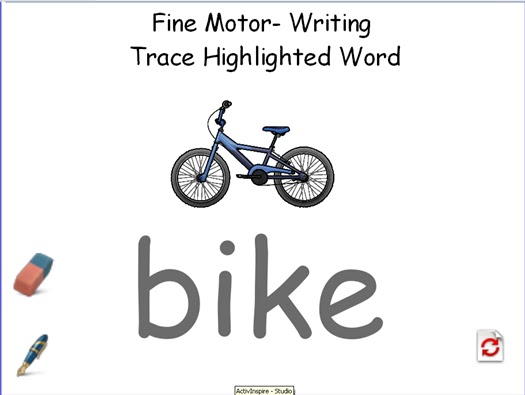
Embedded sound file (right of page) allows for student independence as instructions
are read out loud so students can play file as many times as required. 


Tools like a digital pen and eraser (bottom left of page) can be embedded on the page
to allow for easy student access to tool selection.

The second session provided participants with strategies and suggestions for using the Interactive White Board to support students with Autism. Participants explored how to use the interactive white board to support communication, attention, social skills and participation among their students.


Keep an eye open on Key to Learn for additional sessions throughout the year!

Friday, November 9, 2012

Spotlight: ASD Interactive Whiteboard Learning Communities

Spotlight: ASD Learning Communities


The Assistive Technology team is committed to providing exceptionality-specific professional development within our SEA interactive whiteboard learning communities. Exceptionality-specific groupings enable teachers to network and learn with/from other teachers who may be working with a similar population of learners. The goal of our learning communities is to build capacity among teachers within a culture of collaboration where the expertise and skills of our teachers are honoured and used as a platform for professional learning.

Currently, the team is supporting all teachers of Autism Intensive Support Programs who have received a SEA IWB through two learning community groups – one in the east and the other in the west. Our first sessions were recently held and focused on visual literacy and the use of visual supports for both academic and hidden curriculum areas of learning/development of students with an ASD. Some of the areas discussed included; motor development, visual tracking, anxiety, sequencing discrete tasks and the promotion of social/academic independence through the use of the IWB.

Customizable sample choice board template page that can be used for students to select preferred activities, assignment choices, regulation strategies, etc. 

Sample sequencing page for personal organization at the end of the school day – can include images, various shades/intensity of colour to represent progression towards ‘home time’ and imbedded sound in order to reduce direct adult support/prompting.

Creating lesson activities
Together teachers explored sample lessons/activities, de-constructed the tools and features used to create the lessons and made meaningful connections between the assistive technology, their current professional practice and the teaching/learning needs of their students.

During our imbedded planning time, teachers used the IWB tools and features to create and save visual literacy lesson/activities to be used in classrooms – the very next day!

The first session of the SEA IWB LCs were completed this week. The next session will focus on more curriculum based integration of the IWB in teaching and learning with a particular focus on media and the use of the ActiView document camera.

Friday, September 21, 2012

RWG Flash - AT curriculum lesson examples


This week we have both junior and intermediate lesson examples of the use of Read and Write Gold in integrated Science and Language Arts-focussed lessons.

To find a variety of developed grade level lessons which integrate a variety of assistive technology tools using Read and Write Gold visit our TDSB public page by clicking here.


Summarize, Compare and Contrast

Example: Grade 6 Science and Language Arts: Canadian Space exploration

In the grade 6 lesson, students will research, read, and take notes on one famous Canadian astronomer and one famous Canadian astronaut. Using a compare and contrast graphic organizerpare and contrast graphic organizerpare and contrast graphic organizer, the students will summarize the impact each of these individuals has had on space exploration.


Persuasive Writing
Example: Grade 10 Biology: Ecosystem and Change
In the grade 10 Biology lesson (Academic and Applied), students will research, read and take written notes in order to plan and write a persuasive report about change to an ecosystem. The final report can be written, an audio podcast or video. Students will share information from a text
source and their own ideas about an issue relating factors affecting an ecosystem that they have researched.

Home Use Information
All TDSB staff and students have access to Read and Write Gold at home. For more information about RWG Home Use click here. To get the password, please ask your school.

Even more Read and Write Gold curriculum connections

The Assistive Technology team holds the first of a number of curriculum professional development sessions next week at Burnhamthorpe C.I.  (Adult Learning Centre) BCI in the West and Terraview Learning Centre (TLC) in the East. Both sessions reinforce the use of Assistive Technology Software Read and Write Gold (RWG). One session involves using RWG tools and the research process. The other session involve how students can create "sensational stories" using RWG in the writing process.

The AT team's IRTs provide differentiated learning sessions throughout the school year in other topics including topics involving using the interactive whiteboard to meet the needs of special education students. Also, the AT team technicians provide a wide variety of training in software including (RWG, Clicker5, Dragon Naturally Speaking) and IWB (both Promethean and SMART) throughout the year as well.

All courses are found on Key to Learn. TDSB staff who are interested click here to access the main page K2L catalogue. (A password is required.)


post list